A year into the mainstream adoption of AI coding assistants, the debate on most engineering teams has quietly shifted. It's no longer "should we use AI to write code?" Almost everyone already does - 84% of developers are now using or planning to use AI coding tools, according to Stack Overflow's 2025 Developer Survey, up from 76% just a year earlier.
The real debate is what happens after the AI writes the code. And the data on that question is a lot less comfortable than the adoption numbers suggest.
This piece lays out both halves honestly: the real, measured productivity case for AI-assisted coding, and the equally real, measured evidence that AI-generated code is not automatically correct, secure, or safe to ship without a human engineer checking it - line by line, every time. Then we lay out what a workflow that respects both of those facts actually looks like.
Part 1 - The Real Case for AI-Assisted Coding
Let's start with the honest upside, because it is real and it is measurable.
Raw speed on well-defined tasks. In a randomized controlled trial run by Microsoft Research, 95 professional developers were split into two groups and asked to implement an HTTP server in JavaScript. The group with GitHub Copilot access finished 55.8% faster than the control group. That's not a marketing number - it's a controlled experiment with a clear, replicable task.
Real enterprise outcomes, not just lab results. GitHub's field study with Accenture, covering enterprise engineering teams, found an 8.69% increase in pull requests, a 15% increase in pull-request merge rate, and an 84% increase in successful builds after Copilot rollout. Interestingly, 88% of the code Copilot suggested and developers accepted was still present, unedited, in the final shipped code - suggesting the suggestions that do get accepted are often genuinely usable as-is.
Real, quantified ROI - with an honest adjustment period. DORA's 2026 research on AI adoption found something worth taking seriously: teams see an initial productivity dip of roughly 15% over the first three months of AI adoption, before individual developer output rises by about 12.5%. Full first-year ROI averages 39%, with payback typically arriving around the eight-month mark. Velocity gains cluster heavily on greenfield work - 35 to 40% - while legacy codebases see 10% or less. McKinsey's independent 2023 lab study found almost the identical pattern: roughly 50% time savings on new code generation and documentation, dropping to under 10% on high-complexity tasks. Two different research groups, three years apart, found the same complexity cliff.
Developers report genuinely liking it. McKinsey's study also found developers using AI tools were more than twice as likely to report being in a state of flow and enjoying their work. GitHub's Accenture study found 90% of developers felt more fulfilled and 95% enjoyed coding more.
None of this is in dispute. AI coding assistance is a real productivity tool, and teams that ignore it are leaving genuine speed on the table, especially on new, well-scoped work.
The problem starts with what teams do next.
Part 2 - Why "AI Wrote It" Is Not the Same as "It's Correct"
Here is where the comfortable story runs into a wall of equally rigorous evidence.
AI-assisted code is measurably less secure
The most cited study on this , from Stanford, presented at the ACM CCS 2023 security conference, one of the top venues in the field – put 47 participants through four security-relevant programming tasks. One group had access to an AI coding assistant; the control group did not.
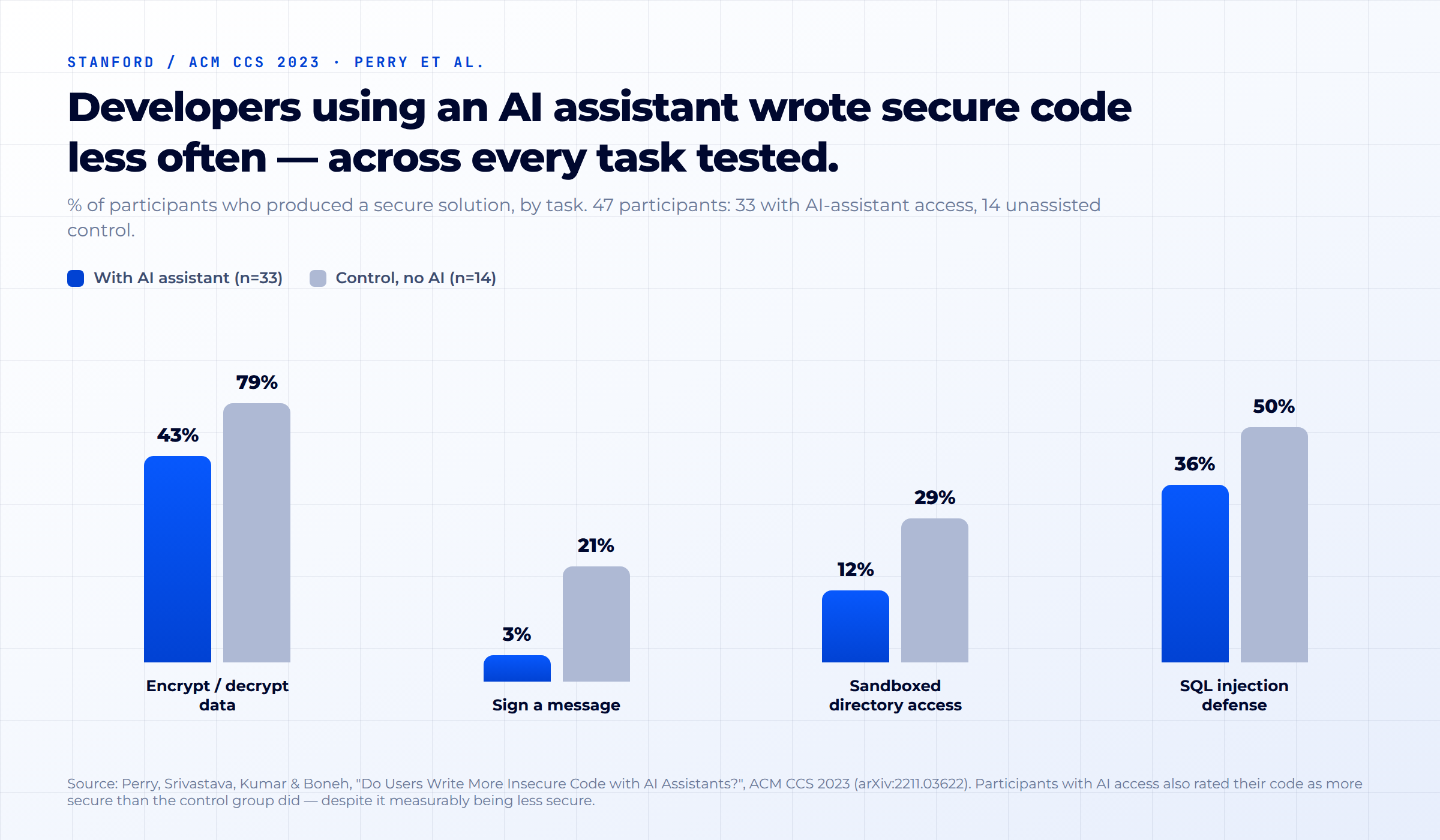
Across every single task, the AI-assisted group wrote secure code less often sometimes dramatically so. On a message-signing task, only 3% of the AI-assisted group produced a secure solution, versus 21% of the control group. On an encryption task, it was 43% versus 79%.
The detail that should concern every engineering leader: participants using the AI assistant were more confident their code was secure than the control group despite it measurably being less secure. The paper's authors call this out explicitly. AI doesn't just introduce more mistakes; it introduces false confidence, in the exact moment confidence should be lowest.
Code quality is trending the wrong way, at scale
GitClear analyzed 211 million changed lines of code across repositories from Google, Microsoft, Meta, and enterprise clients, from January 2020 through December 2024 one of the largest empirical studies of real-world code quality trends available.
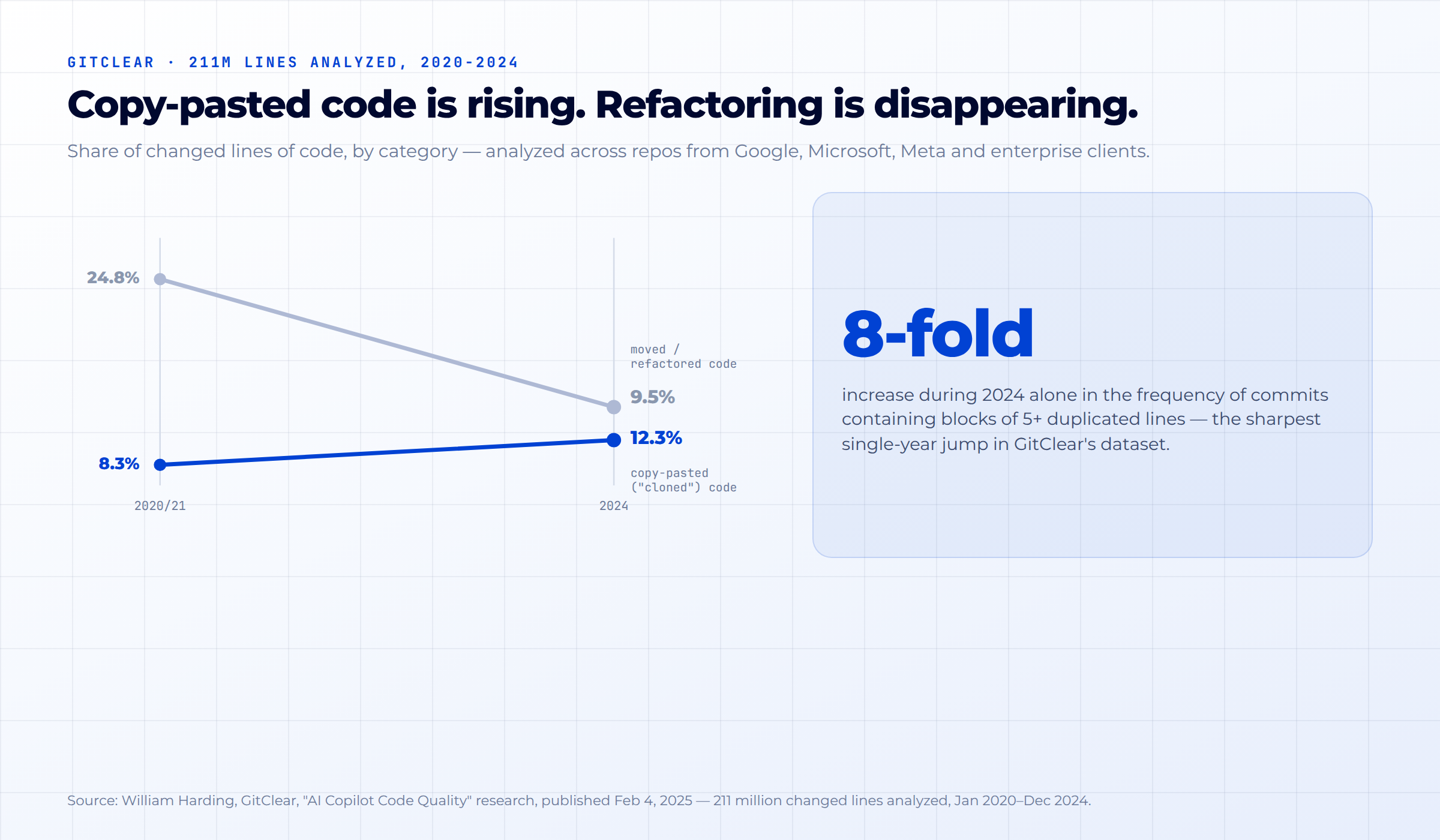
Two trends moved in opposite directions at once. The share of changed lines that were copy-pasted ("cloned") rose from 8.3% in 2020 to 12.3% in 2024. Over the same window, the share of code that was "moved" genuinely refactored and restructured, rather than just duplicated fell from 24.8% to 9.5%. And 2024 alone saw an 8-fold increase in the frequency of commits containing blocks of five or more duplicated lines, the single sharpest year-over-year jump in the dataset.
Put simply: teams are pasting in more code and cleaning up less of it. That is exactly the pattern you'd expect if AI-generated suggestions are being accepted faster than they're being critically reviewed.
AI hallucinates packages that don't exist and attackers are ready for it
A 2024–2025 academic study (UT San Antonio, Virginia Tech, and University of Oklahoma, accepted to USENIX Security 2025) tested 16 code-generation models across 576,000 code samples. 19.7% of all recommended packages did not exist. Open-source models hallucinated at 21.7% on average; commercial models were better but still hallucinated 5.2% of the time.
The genuinely alarming part: 58% of hallucinated package names recurred consistently across repeated runs of the same prompt. That means these aren't one-off random errors they're predictable enough that an attacker can register the fake package name on PyPI or npm ahead of time, wait for developers (or their AI assistants) to suggest it, and ship malware the moment someone installs it. Security researchers have named this pattern "slopsquatting." It only works because AI-suggested dependencies often get installed without a second look.
Newer models haven't fixed this
Veracode's 2025 GenAI Code Security Report tested more than 100 large language models across Java, JavaScript, Python, and C#. AI-generated code introduced a security vulnerability in 45% of test cases overall and Java-specific code failed more than 70% of the time. Two vulnerability classes stood out: the models failed to write safe code against cross-site scripting 86% of the time, and against log injection 88% of the time.
The detail worth sitting with: Veracode found larger, newer models did not show meaningfully improved security over older, smaller ones. This isn't a problem that better models quietly solve on their own. It's a problem in how the code gets used after it's generated.
Part 3 — The Confidence Trap
The most counterintuitive finding in this entire body of research comes from METR, a research group that studies AI capabilities. In mid-2025, they ran a randomized trial with 16 experienced open-source developers, working on 246 real issues in their own mature, complex codebases not toy problems, their actual production repositories.
Developers were allowed to use AI tools (primarily Cursor with Claude) on some tasks and not others, at random. The result: developers took 19% longer to complete tasks with AI assistance.
That alone would be a surprising finding. What makes it remarkable is what the developers believed. Before starting, they predicted AI would speed them up by 24%. After finishing the tasks having just personally experienced being slower they still believed AI had sped them up by 20%.
This is not a story about AI being useless. It's a story about how hard it is for even experienced engineers to accurately judge whether AI actually helped, in the moment, on complex work. Stack Overflow's 2025 survey backs this up from a different angle: only 2.7% of developers "highly trust" AI output accuracy, 46% actively distrust it, yet 66% still cite "AI solutions that are almost right, but not quite" as a top daily frustration, and 45.2% say debugging AI-generated code actually takes more time than writing it would have. Developers don't fully trust the output and still routinely underestimate how much verification it needs.
Put the three findings togetherStanford's overconfidence result, METR's perception gap, and Stack Overflow's trust-but-still-frustrated numbers and a consistent pattern emerges: the moment you're using AI assistance is precisely the moment your instincts about code quality become least reliable. That's not an argument against using AI. It's an argument for never relying on instinct alone to decide whether AI-generated code is ready to ship.
Part 4 - hat Actually Works: The Review Gate
None of the research above says "don't use AI to write code." It says something more specific: AI-generated code needs the same rigor as code written by a brand-new hire on their first week -talented, fast, occasionally brilliant, and not yet trusted with production access unsupervised.
Here's the workflow we use, and recommend, at Algossian:
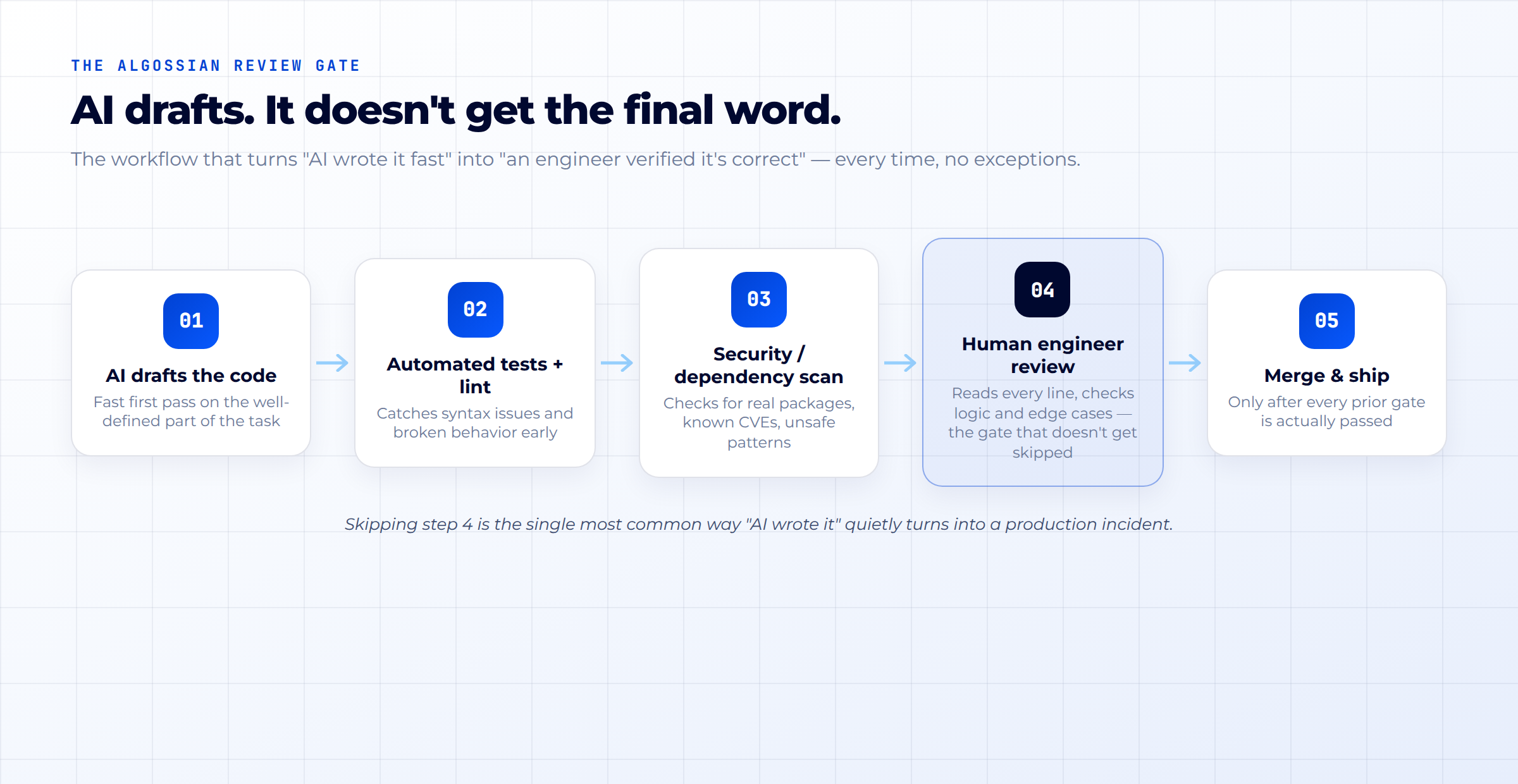
The critical design detail isn't any single step -it's that step four cannot be skipped, automated away, or rubber-stamped. Automated tests catch what you thought to test for. Security scanners catch known patterns. Neither catches a subtly wrong business rule, a race condition that only shows up under production load, or a dependency that looks plausible but was hallucinated. Only a human engineer, reading the actual code with the actual system in mind, catches those.
A practical validation checklist
For any AI-generated code before it merges:
- Read every line - don't skim. If you wouldn't be comfortable explaining what a block of code does in a design review, don't approve it.
- Verify every dependency is real. Check that suggested packages actually exist on the registry you expect, with a plausible download history and maintainer - not just a plausible-sounding name.
- Run the full test suite, and ask what's not tested. AI-generated code passing existing tests tells you it didn't break what you already check for. It tells you nothing about what you never wrote a test for.
- Treat security-sensitive code as a special category. Anything touching authentication, encryption, user input, or data access gets a second, security-focused review pass the Stanford and Veracode research above is specifically about this category of code.
- Check the edge cases the AI wasn't told about. AI writes to the prompt it was given. It doesn't know about the outage last quarter, the customer who sends malformed data, or the regulatory constraint your legal team mentioned in a meeting six months ago.
- Require a named human sign-off, not just a passing pipeline. A green CI pipeline confirms code didn't break known things. It's not a substitute for someone taking accountability for what the code does.
The Bottom Line
The productivity case for AI-assisted coding is real: faster first drafts, genuine ROI within a year, and measurable business outcomes across multiple independent studies. The quality and security case against unreviewed AI code is equally real, equally measured, and based on the GitClear trend data getting worse, not better, as adoption increases.
Both things are true at once. Teams that ban AI coding tools outright are giving up a real, quantified advantage. Teams that accept AI output without rigorous human review are running Veracode's 45% vulnerability rate and GitClear's rising code-clone trend directly into production, usually without realizing it, because the code looks fine and the tests are green.
The teams getting this right aren't the ones with the strongest opinion about AI. They're the ones with the strongest review gate.
Sources
- Stack Overflow, 2025 Developer Survey AI section https://survey.stackoverflow.co/2025/ai
- Peng, Kalliamvakou, Cihon, Demirer, "The Impact of AI on Developer Productivity: Evidence from GitHub Copilot," Microsoft Research, Feb 2023 - https://arxiv.org/abs/2302.06590
- GitHub Blog, "Research: Quantifying GitHub Copilot's impact in the enterprise with Accenture," May 13, 2024 - https://github.blog/news-insights/research/research-quantifying-github-copilots-impact-in-the-enterprise-with-accenture/
- DORA, 2026 AI adoption research (J-curve productivity findings)
- McKinsey, "Unleashing developer productivity with generative AI," June 27, 2023 -https://www.mckinsey.com/capabilities/tech-and-ai/our-insights/unleashing-developer-productivity-with-generative-ai
- Perry, Srivastava, Kumar, Boneh, "Do Users Write More Insecure Code with AI Assistants?", ACM CCS 2023 - https://arxiv.org/abs/2211.03622
- William Harding, GitClear, "AI Copilot Code Quality" research, Feb 4, 2025 -https://www.gitclear.com/ai_assistant_code_quality_2025_research (211M lines analyzed, 2020–2024)
- Spracklen, Wijewickrama, Sakib, Maiti, Viswanath, Jadliwala, "We Have a Package for You! A Comprehensive Analysis of Package Hallucinations by Code Generating LLMs," USENIX Security 2025 - https://arxiv.org/abs/2406.10279; Socket.dev, "Slopsquatting" - https://socket.dev/blog/slopsquatting-how-ai-hallucinations-are-fueling-a-new-class-of-supply-chain-attacks
- Veracode, "2025 GenAI Code Security Report," July 30, 2025 - https://www.veracode.com/resources/analyst-reports/2025-genai-code-security-report/
- METR, "Measuring the Impact of Early-2025 AI on Experienced Open-Source Developer Productivity," July 10, 2025 -https://metr.org/blog/2025-07-10-early-2025-ai-experienced-os-dev-study/
Images in this post (chart1_security.png, chart2_gitclear.png, chart3_workflow.png) are original graphics built from the sourced data above — keep them in the same folder as this file so they render inline.